Letterhead and logo
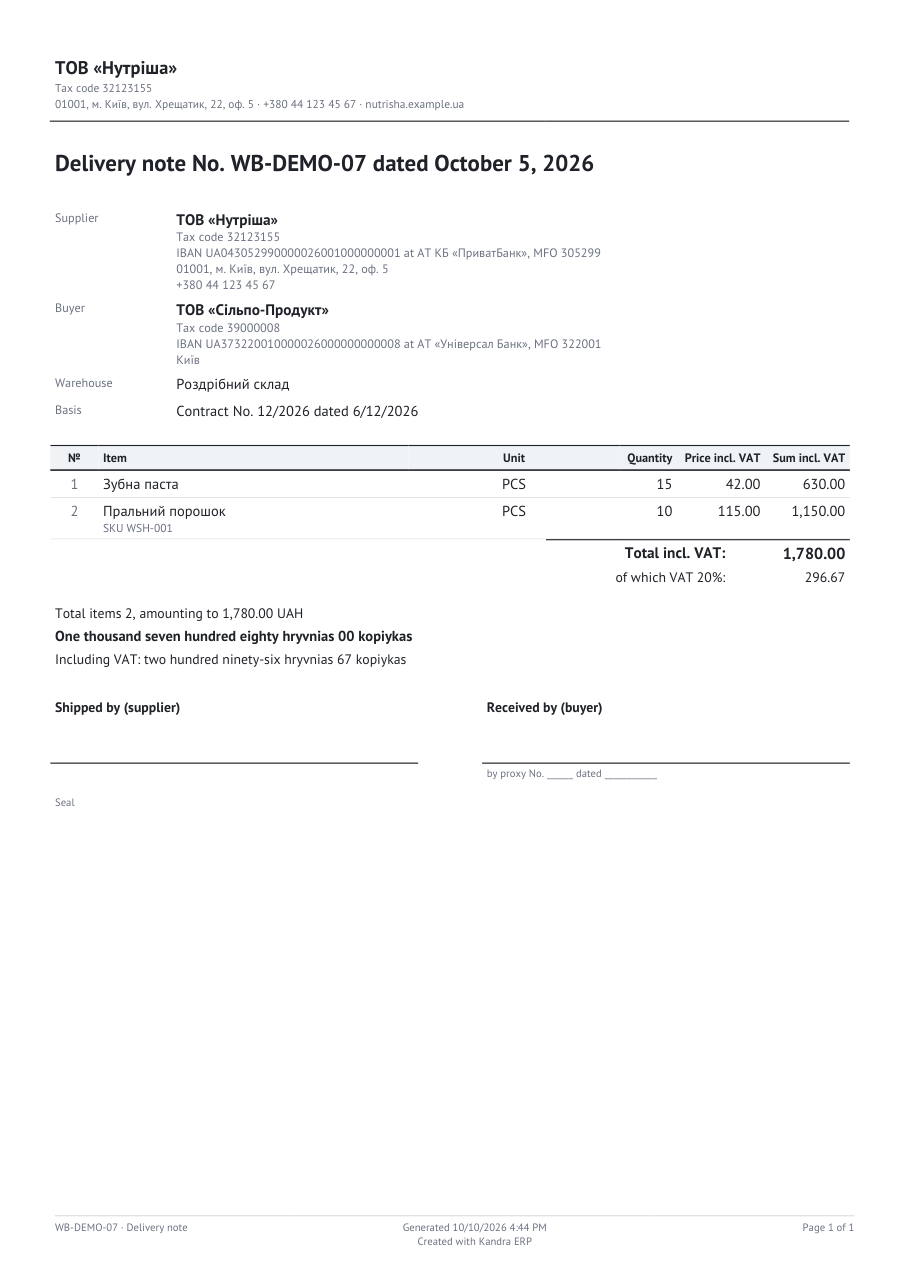
A Letterhead-framed print form shows the company block above its title: the name, the requisites, the contacts and
the logo. No print form carries those details itself. The configuration supplies them once, from its company
constants, and every letterhead-framed form reads them as of the document's date.
There are three parts: the engine's frame provider seam, the configuration's provider that fills it, and the company
constants that the provider reads. A data processor, CompanySettings, is where a user edits the constants.
create-print-form (in your repo's .claude/skills/) covers the same ground for a new configuration. Use
create-constant and create-data-processor when you add or change the company constants themselves.
What the letterhead shows
| Part | Source | Example |
|---|---|---|
| The name, in bold | CompanyName constant | ТОВ «Нутріша» |
| The requisites line | CompanyTaxCode and CompanyVatNumber, joined with a middle dot | Tax code 32123155 |
| The contacts line | CompanyAddress, CompanyPhone and CompanyWebsite, joined with a middle dot | 01001, м. Київ, вул. Хрещатик, 22, оф. 5 · +380 44 123 45 67 · nutrisha.example.ua |
| The logo | CompanyLogo constant, a reference to an uploaded image | The logo, if one is set |
The rules are simple. Empty parts are skipped. If the company name is empty, the form prints with no letterhead at all, rather than an empty block. Under the letterhead, a rule separates the company block from the title.
Where it comes from
The engine owns only the seam. IPrintFrameProvider returns the letterhead valid on a date, or null:
public interface IPrintFrameProvider
{
    ValueTask<PrintLetterhead?> GetLetterheadAsync(DateTime asOf, CancellationToken cancellationToken);
}
The engine's default returns null, which draws no letterhead, so Kandra.Printing works standalone. A
configuration registers its own provider once, after the engine's registrations:
services.AddScoped<IPrintFrameProvider, WmsPrintFrameProvider>(); // the last registration wins
The reference configuration's WmsPrintFrameProvider reads the company constants as of the document's date and
returns a PrintLetterhead(name, requisites line, contacts line, logo bytes):
- The logo is cached by blob reference. A reference's content never changes, because a new logo is a new reference. So the cache needs no invalidation.
- A missing or unreadable logo means no logo, with a warning in the log. A print never fails over its decoration.
RenderAsync resolves the letterhead through this provider. The synchronous Render does not, so a letterhead-framed
form rendered with Render prints without a company block. See Document print forms.
Dated constants: a reprint shows what was valid then
The company details are constants, and a constant has history. Each value applies from a date. Every reader asks for the value as of the document's date, not as of today. So:
- A reprint of an old invoice shows the name, the requisites and the logo the company had on that day.
- A change to the company does not rewrite the documents that were already printed.
That is also why old logos stay attached. A CompanyLogo value is a blob reference. An older dated value still
points at its blob, so a reprint of an older document still finds its logo. Deleting that blob would lose the logo on
every document dated while it was current. The constant's description says so: the blob must stay attached.
Editing the company: the CompanySettings processor
Edit the company through the CompanySettings data processor, not the constants page. It is a form over the company
constants, and it reads like a single-record document:
- New fills every field with the values valid now.
EffectiveFromdefaults to today. - Execute writes only the values that differ from the ones valid on the effective date. Each changed value becomes a new dated value of the matching constant. Unchanged values keep their history.
EffectiveFromcan be a future date, to schedule a change, or a past date, to correct the documents dated since then. Constants are read as of the document's date, so a correction reaches those documents.- The logo is a PNG or JPEG of at most 1 MB. The processor uploads it, keeps every earlier logo attached, and writes
the
CompanyLogoconstant with the new reference.
The processor writes the constants the printing reads:
| Constant | Printed as |
|---|---|
CompanyName | The letterhead name, and the name of the company party |
CompanyTaxCode, CompanyVatNumber | The requisites line, and the company party's codes |
CompanyAddress, CompanyPhone, CompanyWebsite | The contacts line, and the company party's address and phone |
CompanyLogo | The logo, in the letterhead |
CompanyBankAccount | The bank requisites of the company party: its IBAN, bank and МФО. The constant stores the code of the chosen bank account. Empty prints no bank line. |
HomeCurrency, VatRate | The currency of the amounts, and the VAT the documents show |
The company party's name and requisites are on the page twice, once in the letterhead and once as the supplier party. That is intended. The letterhead is the frame's block. The party is the document's own record of who the supplier is.
Overriding the print theme
The look of every PDF is one object, PrintTheme: the type scale, the colours, the rule widths and the cell padding.
The defaults are the measurements of the reference waybill. A configuration overrides any of them at registration:
services.AddKandraPrinting(theme =>
{
    theme.Ink = "#000000";
    theme.TableHeaderFill = "#E8EEF4";
    theme.BodySize = 10;
});
Colours are "#RRGGBB" strings. Sizes and widths are points. The type scale is TitleSize, BodySize,
SecondarySize and FooterSize. The colours are Ink, Muted, Rule and TableHeaderFill.
AddKandraApplication() already calls AddKandraPrinting() without a callback. To override the theme, call
AddKandraPrinting again with the callback after AddKandraApplication(). The last registration wins. The reference
configuration does not override the theme today, so its PDFs use the engine defaults.
Gotchas
- The provider is per configuration, and forgetting it is silent. The engine's default prints no letterhead, and no
error is raised. If your letterhead-framed forms have no company block, check the provider is registered after the
engine's
AddKandraPrinting(). - Don't put the company name, the tax code or the logo on a form. The only company data on a form is the supplier party, and that comes from the same constants.
- A reprint is only as correct as its dated values. A constant set with the wrong
EffectiveFromshows the wrong details on documents dated in between. Set the date to the day the change actually applies. - Don't edit the
CompanyLogoconstant by hand. Its value is a blob reference, and the constants page shows it as raw JSON. UseCompanySettings, which keeps the earlier logos attached.
See also
- Print forms: the frames, and where the letterhead sits in the layout.
- Document print forms: the
RenderAsynccall that reads the letterhead. - Report export: a report that is a document sent to a partner.
- Statutory layouts: the forms with no company block.
- Creating a constant and Creating a data processor: how the
company constants and the
CompanySettingsprocessor are built.